
Introducing Our Enhanced Seating Chart
HoldMyTicket’s newly enhanced seating chart is here to make event planning and the fan experience smoother than ever! We've refined the interface to simplify user navigation and streamline efficiency for event organizers.
Experience the Enhanced Seating Chart in Spark.
Now, with newly optimized color-coding, you can effortlessly segment tickets by price, tier groups, and categories. Plus, better seat selection capabilities empower fans to easily zoom in and out or pan across the map using intuitive gestures, ensuring they find their perfect spot with ease.
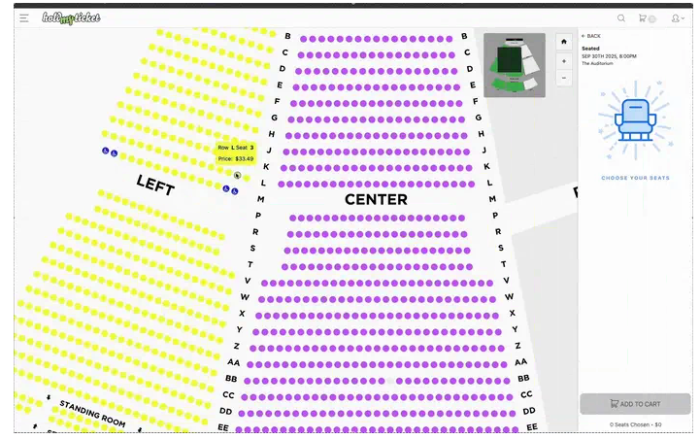
Reserved Seating Simplified.
With HoldMyTicket’s customizable seating chart tool, seamlessly choose from a robust suite of features to plan, manage, and execute successful events.
Real-Time Visibility
- Refined color-coding to visualize the status of every seat
- Instant updates to seat availability, price changes, and accommodations
Versatile Seating Layouts & Design
- Use our ready-made venue templates or get a custom layout created just for you
- Clear two-dimensional visuals of the floorplan and stage sightlines
Enhanced Ticketing Experience
- Interactive seating selection offering a wide or magnified view of preferred seats
- Seamless mobile compatibility that’s fully responsive and optimized for all devices
Login to Spark to try HoldMyTicket’s freshly updated seating chart tool. Get started: https://sell.holdmyticket.com/spark.html
Interested in a quick demo? Our support team is standing by at [email protected] ready to assist.
Meet Flyer Analysis: Your New AI Event Setup Tool
Tired of manually typing out every single event detail? Artist name, date, time, venue info – these tedious details can be applied instantly using HoldMyTicket’s new AI event setup feature.
We just dropped Flyer Analysis on the Spark platform. It's a game-changer. This smart AI feature takes your event flyer and instantly extracts all the key details you need – no more repetitive entries, typos, and formatting inconsistencies. What used to take several minutes now happens in seconds.
How to Opt-In?
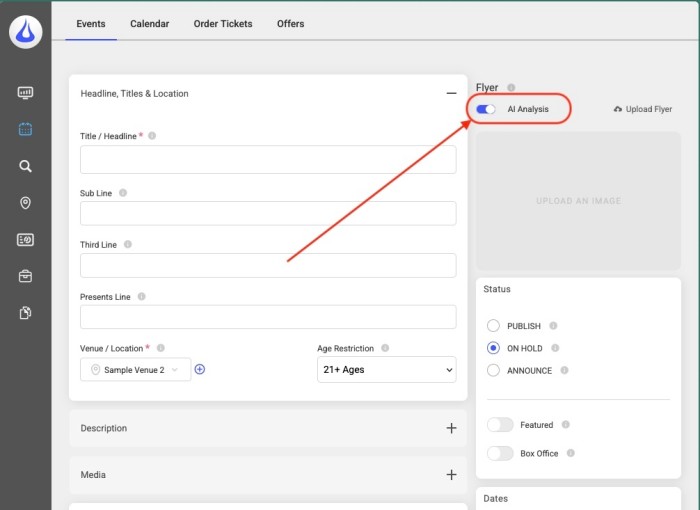
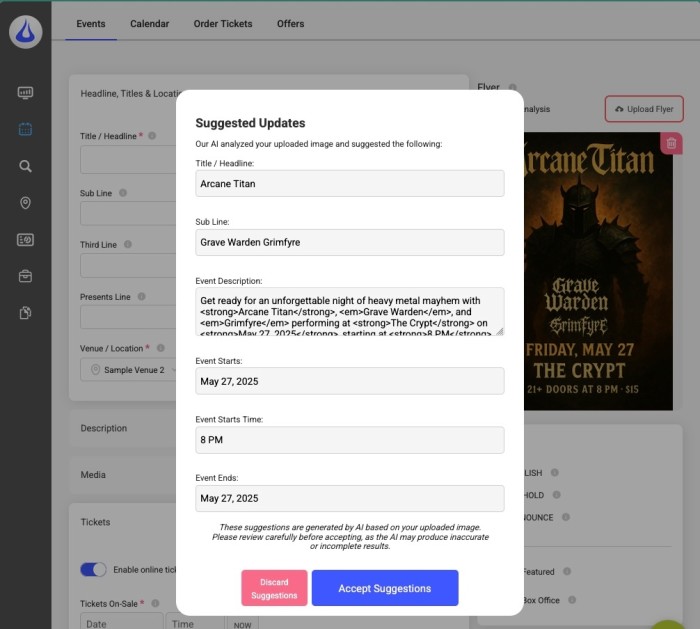
In your HMT Spark account, you can toggle the ‘AI Analysis’ button found in the Create/Update Event section to enable the new AI feature.
How It Works?
Quick Analysis: Once uploaded, AI technology scans your event flyer for essential form details.
SEO-friendly Text: Easily create and publish search-optimized content, such as an event description, using this smart AI feature.
One-Click Apply: Review, approve, and apply analysis suggestions with just a click.
Ready to Try It?
The feature is live right now in Spark. Sign in or Create an Account today! Give it a try on your next event and see how much time it saves you.
Got questions or want to see it in action? Our support team is standing by. Email us at [email protected] – they love showing off cool new features almost as much as we love building them.
Introducing: All-In Pricing
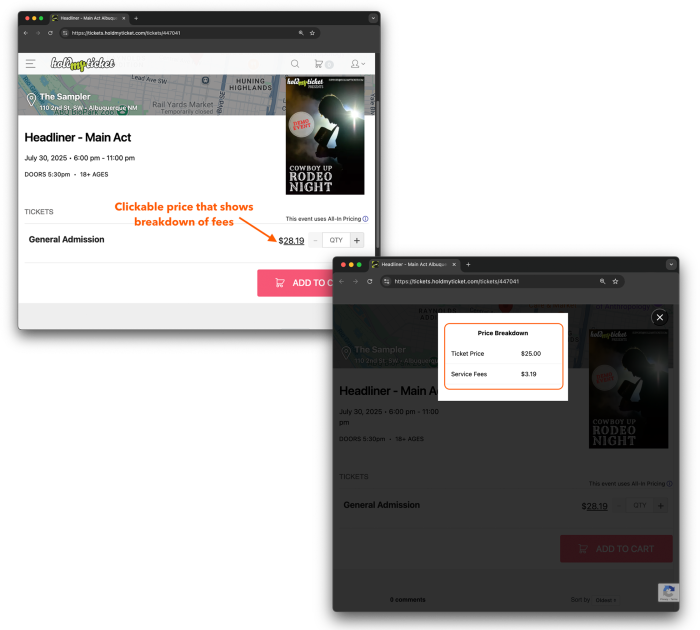
Introducing our newest feature, All-In Pricing. With this change to your ticket price display on our site, All-In Pricing shows your ticket price and any additional fees as one combined price point. As more states start to roll out regulations regarding how prices for your tickets are displayed to your customers to be in compliance with the ruling from the Federal Trade Commission, we have set this in place automatically to make it easier for you to meet this new standard.
Once you have created and saved your event, that's it! It will start showing combined pricing to your ticket buyers and have more information for them as they hover over the price.
If you have any questions about all-in pricing or any other HoldMyTicket features, feel free to reach out at [email protected] or give us a call.
All-In Pricing is integrated with HoldMyTicket's SPARK Event Manager. Get started with HoldMyTicket today.
Master the Basics of HoldMyTicket with HMT 101
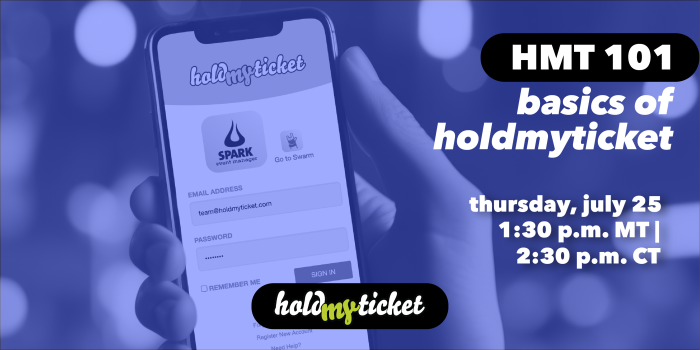 HoldMyTicket is thrilled to announce our very first webinar HMT 101 - Basics of HoldMyTicket! Whether you're a new user or a seasoned pro, this session is designed to help you master the everything you need to use our event ticketing software to hold your events.
When it is:
- Date: Thursday, July 25, 2024
- Time: 1:30 P.M. MT
What we'll cover:
During HMT 101, we will guide through using Spark to manage your events seamlessly and Swarm as a mobile box office, including:
- Creating Events: Learn how to set up events with ease.
- Adding Tickets: Discover the simplest ways to add tickets to your events.
- Effortless Check-In: Get attendees through the door quickly and efficiently.
This webinar is a fantastic opportunity to ask questions and explore features you might not be familiar with. Don’t miss out on this chance to enhance your HoldMyTicket skills.
Important: The webinar meeting link will be sent to verified ticket buyers 24 to 48 hours prior to the event.
Tip In A Pinch: Maximize Attendance Without Overselling Tickets
You want as many attendees as possible at every event. And we want you to sell as many tickets as possible. But in pursuit of sold out events, it’s important not to sell more tickets than should be possible.
Prevent overselling your events by paying attention to your venue capacity settings. Set your venue capacity — or how many maximum seats are available at your venue — under ticketing options during the event creation or editing process. Save time by setting your venue capacity as part of your venue preferences when you add a new venue.
Use ticket buckets to manage your capacity when your event involves multiple ticket types, such as multi-day passes, various general admission packages or tickets with accommodations like overnight camping.
Ensuring fans who pay for tickets can get into your event is an important part of keeping your ticket buyers happy. For more ways on turning attendees into fans, and rocking at outstanding customer service, check out our blog and resources.
Holding Space for Ruidoso Wildfire Victims
 The South Fork Fire and Salt Fire, which ignited on Monday, June 17 near Ruidoso, New Mexico, have brought devastation to the local community.
While local evacuations were being lifted Monday, June 24 after a week, the fires displaced over 8,000 people and destroyed approximately 1,400 structures, according to local media reports. The full impact of the fires is still being felt even as the full extent of the loss and damage is being assessed. Currently, the FBI is offering a $10,000 reward for information leading to the arrest and conviction of those responsible for starting these wildfires, and some areas are still being treated as crime scenes.
At HoldMyTicket, we are deeply committed to supporting our local event organizers during this challenging time. We understand that many residents, including our event organizers, are still without basic needs, including water and internet. We are proactively reaching out to offer assistance with managing events, handling postponements and refunds, and ensuring effective communication with customers. If there's anything else we can do, just let us know.
While we understand the frustration and uncertainty ticket holders for upcoming events may feel, we urge you to remain patient as event organizers and their teams navigate the complexities of this disaster, both professionally and personally.
We stand with our community and are here to help in any way we can. To further aid those impacted by the South Fork and Salt fires, we are offering reduced fees to event organizers and promoters hosting events in support of the affected community.
Please consider making a donation to support those on the ground. Here are some organizations helping out:
Greatest Needs Impact Fund: The Greatest Needs Impact Fund held within the Community Foundation of Southern New Mexico is currently directing efforts to Lincoln and Otero counties to assist with the impact of recent wildfires.
New Mexico Fire Relief Emergency Response Fund: The Emergency Action Fund for New Mexico Fire Relief will provide support to the Greatest Needs Impact for Ruidoso Fund. The Emergency Action Fund will be managed by the Foundation and United Way of North Central New Mexico, who will work with partner agencies in the county.
GoFundMe Fundraisers: KOB 4 is partnering with well-known New Mexico musician and social media personality Johnny James to help victims of the wildfires around Ruidoso with a GoFundMe. You can also check out other verified GoFundMe accounts to contribute to wildfire victims.
American Red Cross: The American Red Cross is accepting monetary donations to support emergency efforts surrounding the Ruidoso wildfires. Donate one or by texting REDCROSS to 90999.
The Salvation Army: The Salvation Army, Southwest Division is accepting donations as well. Monetary donations can be made at NewMexico.SalvationArmy.org or by texting RUIDOSO to 51555.
Anatomy of a Great Event Poster: Designing Event Posters That Captivate
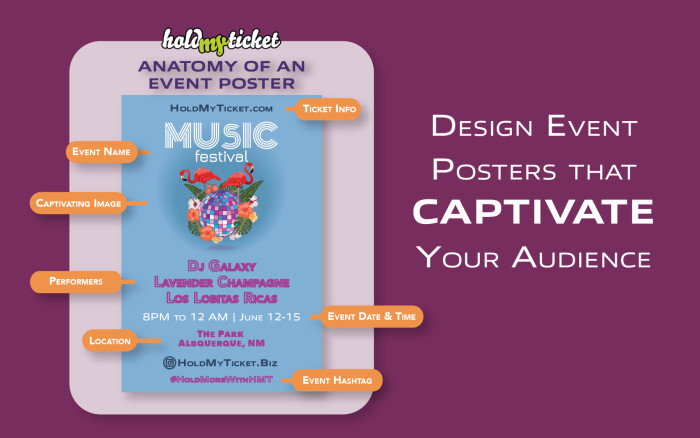
A great poster is both an invite and a sneak peek into your event.Your event poster should say more than just "Hey, we're having an event."
It should radiate your vibe. You want to get people feeling something, makng them look forward to what's in store at your event. Think of your event poster as a way of saying "Hey, come see what we've got planned,” by telling a little story that also gives potential attendees everything they need to know about getting to and enjoying your event.
Whether you’re plastering it around town, sharing it on social media, or adding it to your event, your event poster should pique your audience interest. Design with them in mind.
The Perfect Event Poster
Creating an engaging and informative event poster is both an art and a strategy. Here's how to ensure yours captures attention and communicates effectively:
- Event Basics: Begin with the essentials: the event's name, date, and time, prominently displayed to catch the eye. Don't forget the venue location, crucial for in-person gatherings, or access details for virtual ones.
- Attractions and Visuals: Highlight the main attractions— mention any performers, or activities that might spark interest.
- Captivating Visuals: Use compelling visuals that reflect the event's mood and theme, making your poster not just informative but memorable.
- Ticketing Information: Clearly indicate where people can purchase tickets and look up ticketing information, such as a website or venue box office. Keep in mind you can offer online ticket sales with HoldMyTicket, easily directing people to your event page.
- Connectivity and Engagement: Incorporate contact information and social media details, offering pathways for further engagement and information. A dedicated hashtag or event page can encourage sharing and create a buzz online.
Creating a powerful event poster can be a challenging process but by incorporating essential elements, it can be incredibly rewarding.
Get More from HoldMyTicket
Get more tips and insights on trends by checking out our blog regularly.
Creating Inclusive and Welcoming Events
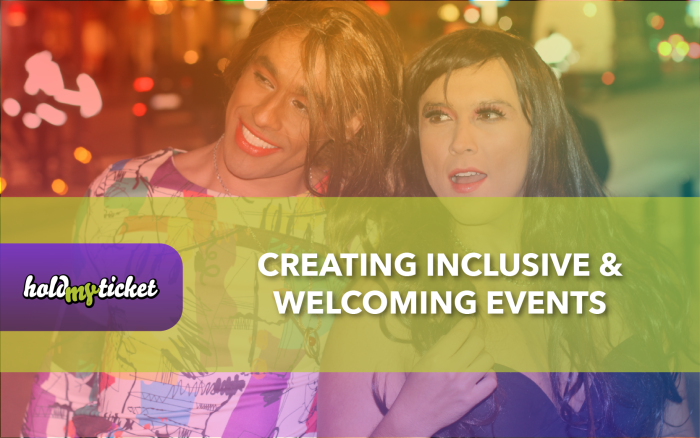
Events bring people together, and everyone should feel comfortable and welcome, whether it’s a concert, festival, or conference. Inclusivity is key to making that happen. Here’s a few ways you can make your event friendly and inclusive:
Set Clear Goals: Decide what you want to achieve—raising awareness, celebrating a community, or just making sure everyone has a great time regardless of their identity or background.
Choose the Right Venue: Make sure your venue is friendly to all. Check its history with marginalized communities and ensure it’s accessible for everyone, including the LGBTQ+ community and people with disabilities. Gender-neutral restrooms are a must, and no discrimination or harassment should be tolerated.
Get Everyone Involved: Bring in people from different communities to help plan the event. Partner with community organizations for resources and insights, and recruit a diverse team for planning and performances.
Do Your Homework: Research your performers, vendors, and sponsors to avoid those who have discriminated against marginalized groups. Pick partners who genuinely care about inclusivity and stay updated on any controversies involving potential collaborators.
Use Inclusive Language: In your marketing and interactions, such as your event description or marketing emails, use language that’s welcoming and non-discriminatory. Avoid offensive words and stereotypes. Listen to feedback from the community and use gender-neutral language. Respect everyone’s pronouns and don’t push for personal info.
Planning inclusive events might take a bit more effort, but it shows you respect all your attendees. Creating a safe and welcoming environment is always worth celebrating.
Tip in a Pinch: Keeping Attendees in the Know
We know that things don’t always go as planned. Whether things hit the fan, or you just need to move dates, we understand that changes are going to happen. When they do, remember to give your attendees a heads-up.
Quickly update your event information, and notify everyone about new dates or important information. Use our event messaging tool to let your attendees know about any postponements or updates, like parking lots or street closures.
If you have questions or need a hand using any of our tools for your events, just shout. We're here to help!
You can also check out our full library of resources.
Ticketing Transformation: How Promoter Ryan Levy Swapped Chaos for HoldMyTicket Calm
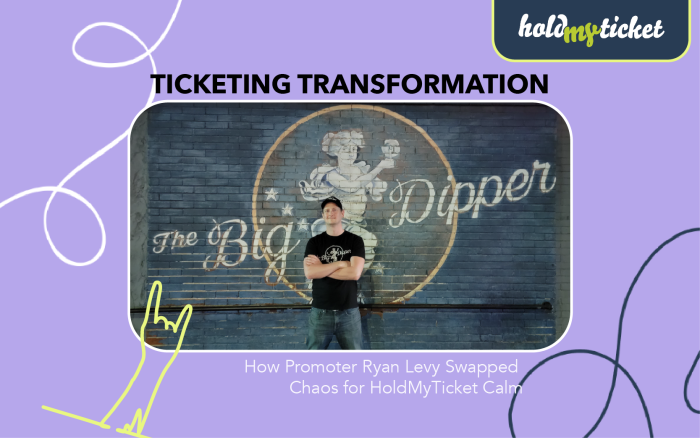
When Ryan Levey took over a historic venue in downtown Spokane, Washington, he made a shocking discovery - the venue used Venue Pilot to ticket and manage events. He reacted viscerally.
“Hell no!”
He knew what had to be done and took immediate action. He signed the venue up for a HoldMyTicket account. “It’s way better,” he reasoned coolly.
Back in 2011, a few years into his now-16 year-old career as a promoter, Ryan was introduced to the power of HoldMyTicket. As an event organizer with events at multiple venues, Ryan was struggling to keep his events organized while using yet another event ticketing platform that was failing to meet his needs. The problem plagued Ryan, following him into conversations with fellow promoters. Finally, after he exasperatedly shared his misery of managing his events once more, a solution was offered to him by another event organizer: HoldMyTicket.
“They’ll get you set up with everything in just a few days,” the wiser promoter advised. “They’ll even hook you up with a website.”
Ryan heeded the advice immediately and within a few days, he was indeed set up with everything he needed to manage and ticket his events. HoldMyTicket even hooked him up with a website. And it was all provided for free. Ryan couldn’t believe the vast capabilities he acquired with the software, discovering “HoldMyTicket is a lot more intricate, in a good way.”
It was then that Ryan vowed to always use HoldMyTicket. The platform, featuring easy event creation and ticket customization, has become an indispensable tool when it comes to managing and growing his business. Reports, coupons and the newsletter tool are essential to running his venue the best way he knows how. Using anything but HoldMyTicket is unconscionable to Ryan. “It is a staple on site that I use regularly.”
Within days of signing up his new venue for an account with HoldMyTicket, the new system was being implemented. More than a decade later, the process was still impressively simple, a testament to the platform’s ease and reliability.
“It is the tried and true method that never fails,” Ryan affirmed, with no reservations about how HoldMyTicket has impacted his career as a promoter.
“I can honestly say that HoldMyTicket has been the greatest companion to me as a promoter, and to be successful in the events I set up. And to also grow my business with reliable and effective tools.”
Tip in a Pinch: Don't Go Retro Proactive Tips for Event Pros
Whether or not Mercury is in retrograde (it is), we know that stuff is gonna happen. That’s why we want to help you be ready for anything and everything when it comes to your events, and solve any ticketing problems before they start.
Here are a ✌️couple of ways to be proactively prepared for turbulent times, and always:
- Get familiar: Our software is a bit like a magical bag - it just keeps giving everything. See all we have to offer by logging into Spark and checking out different event settings and features. From adding tickets and setting up sales start and stop times, to creating time-saving default settings, everything you need to organize and market your event can be found in our event management platform.
- Practice makes perfect. The best way to learn something is to do it. One of the best things about HoldMyTicket is that our software is designed with you in mind. Its setup is meant to be intuitive and easy to use. It’s also hard to “break,” so it’s ok to explore different settings, tools or ways to set up your tickets - just be mindful about what you’re publishing! ? If you encounter any problems, relax knowing we’re here to help. Remember: It’s always better to figure out something during a practice run than in live time.
- Ready your supplies: Whether you’re selling hard tickets or eTickets, events are all about getting tickets to your attendees. If you’re ordering tickets for your show, make sure you put in your order with enough time for our team to print and ship them to you from our offices in sunny Albuquerque, N.M. For eTickets, make sure fans know if you’re using delayed delivery and will be getting their tickets in the days leading up to your event. And most importantly, make sure you have enough equipment to get people in the door. Turn any phone into a scanner, or reach out to us a few weeks before your event to get everything you need sent your way.
We know you have a lot to do; that’s why between Spark, our event management app, and Swarm, our mobile box office, HoldMyTicket has a lot to offer. Work smarter, not harder by logging in and exploring all our time-saving tools and features now. If you have questions or requests for additional information and training, reach out to us.
You can also check out all our resources and blog for more tips on rocking your events, like our guide on holding sustainable events
Engaging Gen Z in the Event Space: Strategies for Organizers and Promoters
Connecting with ticket buyers and event attendees across all demographics is essential when it comes to maximizing your ticket sales and profits.
Adapting how you plan and promote events to attract younger people can be really rewarding. About 51% of Gen Z go to live events every few months, which is more than the 44% of millennials and much more than the 19% of people who are 55 and older.
Event organizers can bank on Gen Z's regular event attendance by adding certain things to their marketing and planning, like being genuine, using technology, and making things easy.
Cut Through the Noise by Prioritizing Transparency and Essential Information
More than anything Gen Z cares about authenticity and transparency. Focus on being real, honest and open. Gen Z doesn’t like too much unnecessary info, so keep event ads straight to the point. Make sure your marketing and promotion are clear and show exactly what to expect, using pictures to share your main messages quickly. Your event info, like events pages, descriptions, and posters, should clearly explain who, what, when, where, and why. Tell them why the event matters, what they'll get from it, how much it costs, and any health or safety rules. Be honest about any sponsors or partners since Gen Z doesn't like sneaky tactics. Also, keep them updated during the event using their favorite online ways, and keep messages short and relevant. Make sure to consider accessibility of all sorts to avoid a faux pas that could result in your event’s online infamy.
Leverage Digital Tickets and Mobile Engagement
Using digital tickets is essential, not just handy, for attracting Gen Z to events. Etickets, along with mobile apps or online platforms that offer live updates, allow for networking, and provide extra content about the event, really appeal to Gen Z's love for smooth, digital-first experiences. These digital tools also act as a central place for all information related to the event, cutting down on the need for paper and supporting Gen Z's growing interest in protecting the environment. This approach matches their preferences for efficient, tech-savvy solutions and shows understanding of their environmental values.
Smart Use of Social Media, Moving Beyond the Use of Influencers
While social media is still key for reaching Gen Z, the approach needs updating. Instead of mainly using influencers, whose impact and trustworthiness are dwindling with Gen Z, focus on creating content they'll want to share. Offer behind-the-scenes glimpses, encouraging content created by users, and letting attendees help tell the event's story. Now, it's more about working with micro-influencers and real supporters of the brand who may have fewer followers but those followers are more dedicated and active. Working with these influencers can make your event's promotion feel more real. Also, letting all attendees share their own true experiences online can naturally extend your event's visibility. It's important to keep using platforms like Instagram, TikTok, and Twitter, but make sure the content is not only genuine and engaging but also offers real value, not just ads.
Adapt Your Selections
Understand that Gen Z wants something different. Instead of traditional party scenes, they're interested in entertainment that fits into their wellness lifestyle. Add wellness activities to your events and use digital tools to match Gen Z's preferences, making your place feel forward-thinking and welcoming. Since Gen Z isn't as into alcohol, offer unique non-alcoholic options like mocktails and craft sodas. Enhance the experience with interactive features like virtual reality and special theme nights. By emphasizing the social and cultural sides of your events, such as encouraging community involvement and appreciation for the arts, you'll attract those looking for deeper connections. Attracting Gen Z to events means being transparent, innovative online, and real on social media. Offer straightforward information, use digital tickets and apps, and make social media more engaging and authentic. This approach helps build a real connection with Gen Z. Aim to craft not just events, but experiences that reflect their values, tastes, and digital priorities.
Get more insights and tips by checking out all our resources.